Assigning a Qualification to an Employee
If your employee requires specific qualifications to carry out their job, you can add these to their profile.
From the dashboard, click on Employee.

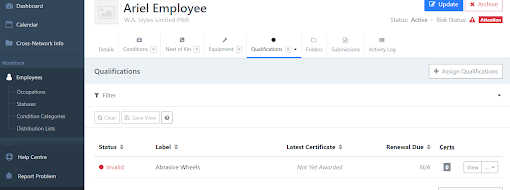
Select the employee you are wanting to add the qualification to, for this example we will use Ariel Employee. From the profile click on the Qualification Tab.

A drop down menu will appear, from here click on Manage.

The ‘Assign Qualifications’ box will appear and you can choose the required qualifications from the drop down menu.

Tip - You can select multiple qualifications by holding down the Ctrl key.

Once you have selected the required qualifications, click Assign.

You will now see the qualifications assigned to your employee and are now ready to be awarded.